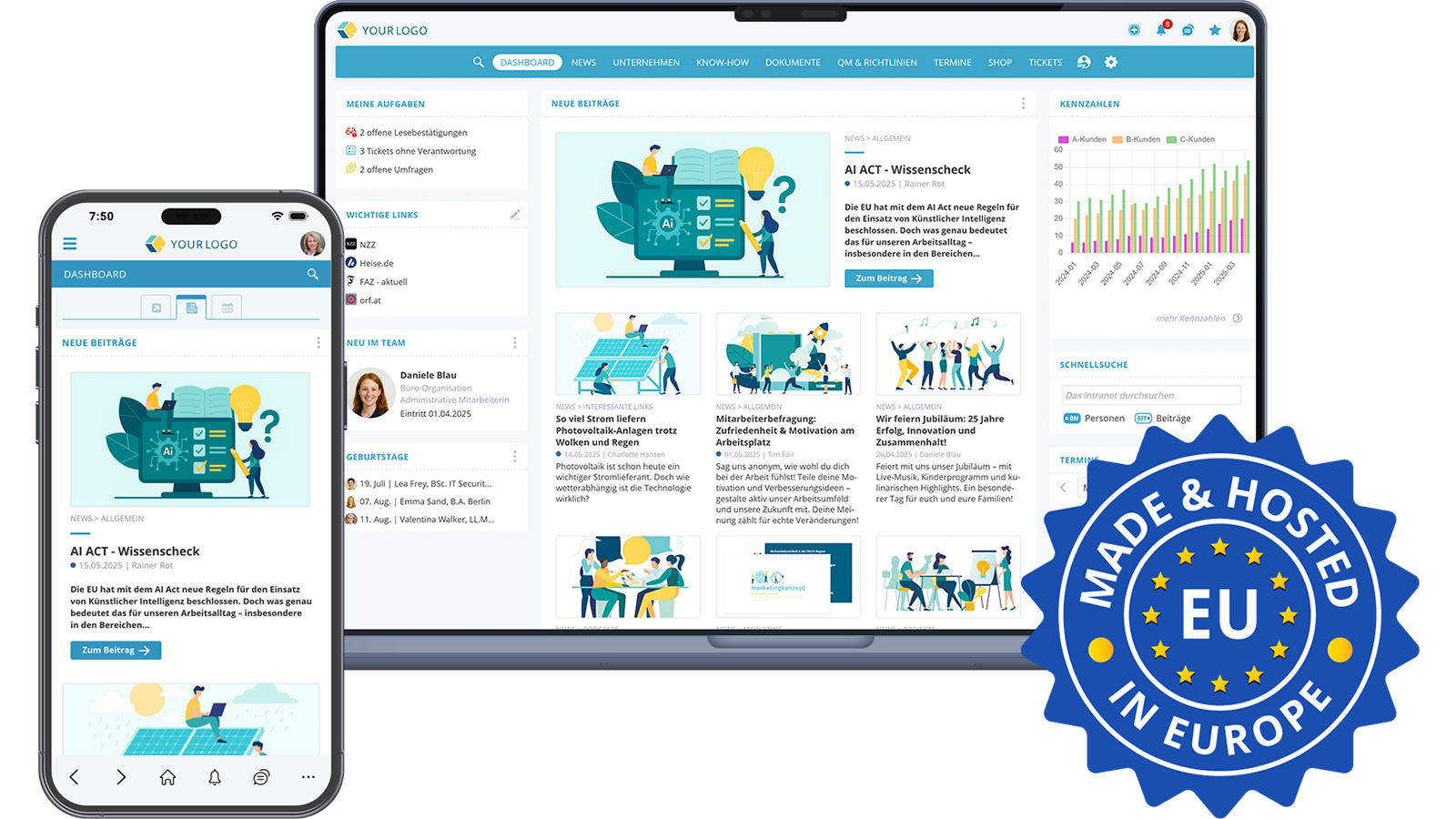

This article explains what AI in the intranet means, which functions have proven themselves in practice, what companies and organisations should bear in mind from a data protection perspective, and how modern social intranet software such as KenCube integrates AI responsibly.
What does AI in the intranet mean?
AI in the intranet refers to generative and supportive AI functions that are built directly into a social intranet software. Instead of opening a separate AI tool in parallel, employees use the AI where the content is created: in the post, in the wiki, in the chat or in the document. This shifts the focus away from "AI as a separate tool" towards "AI as an invisible helper at the workplace". A modern intranet software combines AI functions with role and permission concepts, EU hosting and clear governance to keep internal company content secure. Three characteristics distinguish AI in the intranet from a stand-alone solution:
- It accesses the existing context (posts, wikis, files).
- It respects existing permissions and visibilities.
- It is embedded in the existing editorial and communication process.
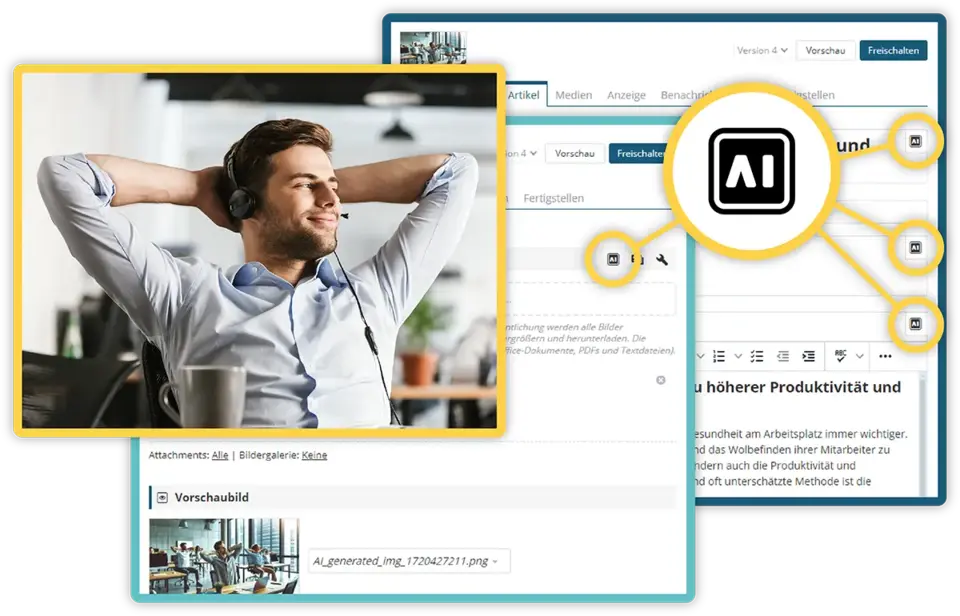 AI tools support the editorial team in content creation
What is AI in the intranet typically used for?
Daily work in a social intranet software offers many areas where AI today saves measurable time. The following application areas are among the most important and are exactly those that KenCube covers in its AI in the intranet.
Write and check texts faster
Posts, news items or wiki articles are formulated, corrected or improved with AI in seconds. Anyone who has a draft can have it checked for tonality, comprehensibility and spelling. Anyone who does not yet have a draft enters the key points and receives a first version. This lowers the threshold for publishing in the intranet at all, and significantly increases the reach of internal communication (Gallup, "State of the Global Workplace 2025").
Summarise long content
From multi-page guidelines, minutes or knowledge articles, the AI in the intranet creates a short version at the push of a button. Employees grasp the key message in a minute instead of spending half an hour reading. This is particularly valuable in industries with many regulations, in which documents pile up quickly, such as in regulated areas like healthcare operations or financial institutions (McKinsey, From promising to productive: Real results from gen AI in services, 2024).
Ask content-related questions directly in the chat
Instead of a classic search, employees ask the AI in the intranet directly: "How does the travel expense process work?" or "What does the current crisis guide say?". The AI provides an answer based on the approved content of the knowledge base. As a result, the burden on HR, IT and internal helpdesks decreases noticeably.
Generate preview images and visuals
Instead of searching the image archive for suitable stock photos, the AI generates a suitable preview image for the post. This speeds up publication and ensures a more uniform appearance in the intranet. Those without their own design resources benefit particularly.
Translations with AI in the intranet for multilingual teams
In companies with international locations, AI is used for ad-hoc translations. Content is delivered in the language of the recipients without editorial teams having to prepare every text in multiple languages. This function is also available in the employee app, so that field staff and production employees benefit equally.
Which AI functions in the intranet really make sense?
Not every AI gimmick brings added value in everyday work. Three criteria help in selecting the right functions of an AI in the intranet:
- frequency of use,
- measurable time savings and
- security for internal company content.
In practice, four functional areas have established themselves, all of which are covered in KenCube's AI in the intranet:
- Editorial AI support for writing, correcting and optimising posts
- AI chat for content questions about posts and documents
- Automatic preview image generation for news and articles
- Ad-hoc translations directly in the post and in the employee app
It is important that these functions are rolled out in a controlled manner. In the KenCube admin area, it is possible to define at group and user level who may use the AI in the intranet. This keeps the AI integration cost-efficient and complies with the requirements of the EU AI Act, which requires basic AI literacy of users for certain use cases (EU AI Act, Article 4).
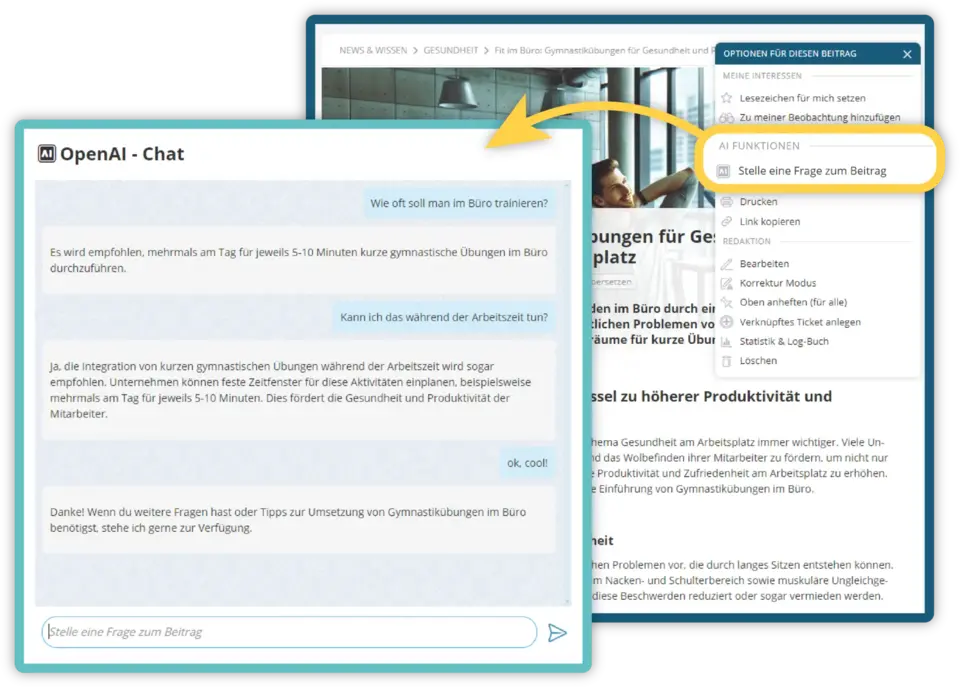 AI chatbot answers questions about posts and document contents
Using AI in the intranet in compliance with data protection
Data protection is the prerequisite for introducing AI in the intranet seriously at all. For companies and organisations in Europe, three topics are at the forefront: GDPR compliance, EU hosting and transparent provider selection (Data Protection Conference, "Guidance: Artificial Intelligence and Data Protection": Official guide for companies, authorities and organisations).
KenCube offers AI in the intranet as an integrated interface. Communication is carried out in compliance with data protection, without user data being transferred to the AI that could be further processed for training or other purposes. The data and hosting are located in ISO 27001-certified EU data centres under European jurisdiction.
Three building blocks ensure the necessary control:
- The AI connection is optional and can be activated on a group basis.
- Currently, Mistral and OpenAI are available with data protection-friendly packages.
- The contract with the respective AI provider is concluded directly between the company and the provider, so that billing and responsibility are clear.
In this way, AI in the intranet meets the requirements that small and medium-sized enterprises as well as corporations and organisations in Europe place on internal software today (Bitkom Research – ""Artificial Intelligence in Germany"", Study 2025).
How KenCube implements AI in the intranet
KenCube is a social intranet software for SMEs, corporations and organisations with a flat-rate building block system. Instead of unlocking functions individually, most modules are available from day 1 and can be activated as required. AI in the intranet is part of this building block system and not an expensive additional package.
The implementation follows three principles:
- A controlled activation via permissions per group or person, with a gradual rollout and clear evaluations.
- Direct embedding in the workflow: The AI sits in the post editor, in the wiki and in the chat, i.e. where work is done.
- Transparent providers, currently Mistral or OpenAI, each with a data protection-compliant configuration. Further AI integrations are planned.
The two access points to the platform also benefit equally. In the social intranet, the editorial team writes posts with AI support on the desktop because longer texts and structures can be edited better on a large screen. In the employee app, colleagues read the finished content on the go, have long documents summarised or briefly ask the AI in the intranet a question. Both access points share the same content, rights and data.
Best practices for introducing AI in the intranet
So that AI in the intranet is accepted in everyday work and not perceived as a chore, it is worth considering some experiences from successful rollouts.
Start small with AI in the intranet and expand gradually
Instead of rolling out all AI functions simultaneously, it has proven effective to start with two or three clearly defined use cases. A typical entry point is correction assistance for the editorial team plus summaries for long knowledge articles. Once these functions are established, further building blocks such as AI chat, preview images or translations are added.
Train employees instead of just enabling access
The EU AI Act requires basic AI literacy of users for certain applications. Even without this legal obligation, a short training session makes sense. It builds trust, reduces misuse and makes AI in the intranet a permanent standard tool more quickly. KenCube supports this with its own training formats and an integrated e-learning function.
Define clear governance
A one-page AI policy is sufficient in most cases. It answers three questions:
- Which content may be processed with AI, and which may not?
- Who reviews AI-generated posts before publication?
- Who is the contact person for questions?
These points belong in the KenCube knowledge base and are thus available to all employees.
Measure success instead of guessing
Classic key figures such as reading time, posts per editorial team and search queries per month quickly show whether AI in the intranet really provides relief. In KenCube reporting, these values are automatically captured and can be used as a basis for the next expansion stage.
Frequently asked questions about AI in the intranet
What is AI in the intranet?
AI in the intranet refers to AI functions that are integrated directly into intranet software, for example for writing, summarising, searching or translating content. They access existing permissions and content and thus replace separate AI tools.
Is AI in the intranet GDPR-compliant?
AI in the intranet can be operated in compliance with the GDPR if the AI interface is configured so that no user data is fed into training, hosting takes place in the EU and permissions are set correctly. KenCube uses corresponding packages from Mistral and OpenAI and hosts in ISO 27001-certified EU data centres.
Which AI functions do employees really need?
The greatest effects are seen with four functions: text creation and correction, summaries of long documents, AI chat on existing content and automatically generated preview images. These very functions are included in KenCube's AI in the intranet.
How can AI in the intranet be used in a controlled manner?
Via role and group rights, gradual activation per module and a one-page AI policy in the wiki. In the KenCube admin area, it can be specifically determined who may use the AI. This enables cost-efficient management and brings the introduction in line with the training requirements of the AI Act.
What distinguishes AI in the intranet from ChatGPT or similar tools?
An external AI has no access to internal content, knows neither permissions nor organisational structure and is often problematic from a data protection perspective. AI in the intranet, by contrast, is embedded in the platform, respects existing visibilities and works on the approved content of the knowledge base.
Experience AI in the intranet from KenCube live
If you would like to see KenCube's AI in the intranet for yourself, we would be happy to present our social intranet software and employee app to you in a non-binding online demo.

Working as a consultant in the IT industry for over 30 years, specialist in software development, AI-supported data processing and neural networks, studied at WU Vienna
 Praktische Feature-Auswahl