


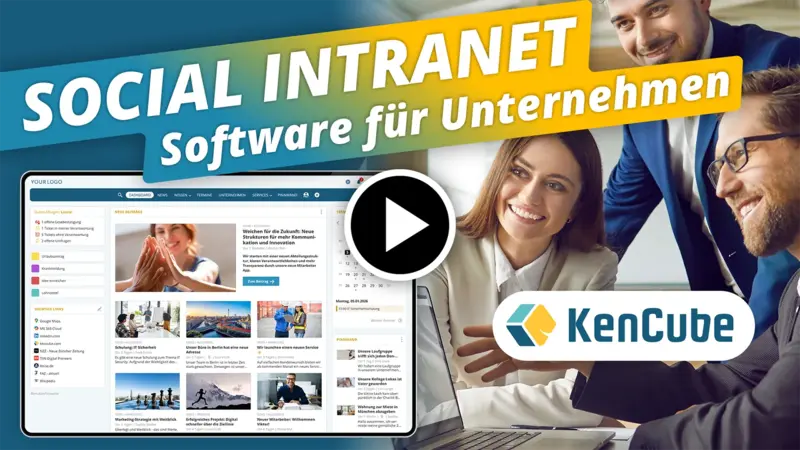
The Social Intranet Software for SMEs & Organisations
Enhance engagement and collaboration through effective internal communication and smart digital services
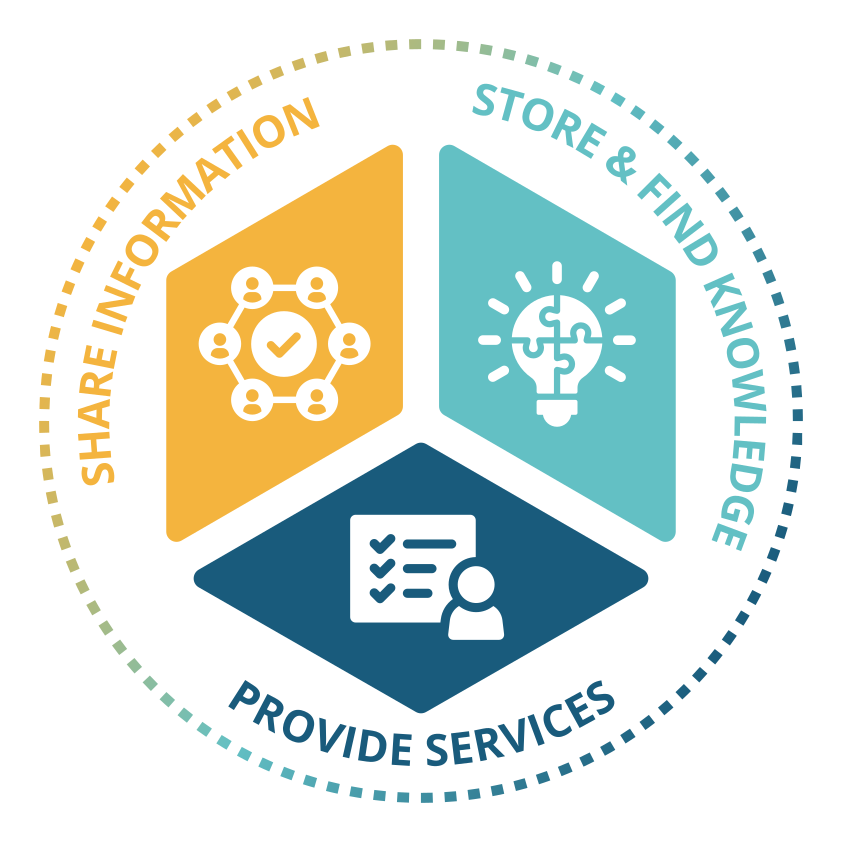
What are important Key Functions of a Social Intranet Software?
Share information.
- Distribute news, announcements & team updates effectively
- Provide a company calendar & enable appointment bookings
- Use one-to-one & group chats for fast communication
- Encourage feedback and boost engagement with social features
Store & find knowledge.
- Build a centralized knowledge base for expertise & quality management
- Store and provide templates, images & documents in a structured way
- Map the organizational structure and easily find colleagues
- AI integration with powerful search and filter options
Provide services.
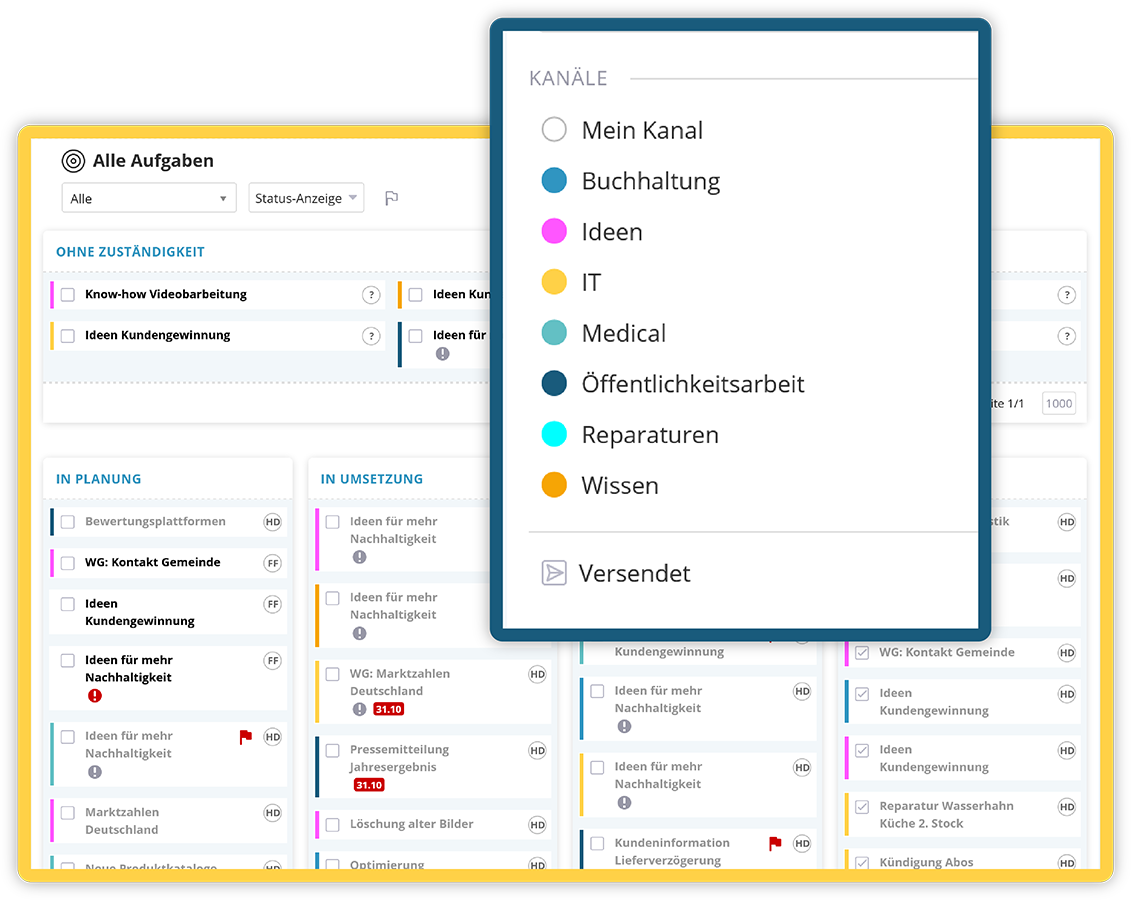
- Use digital forms, assign tasks & manage tickets
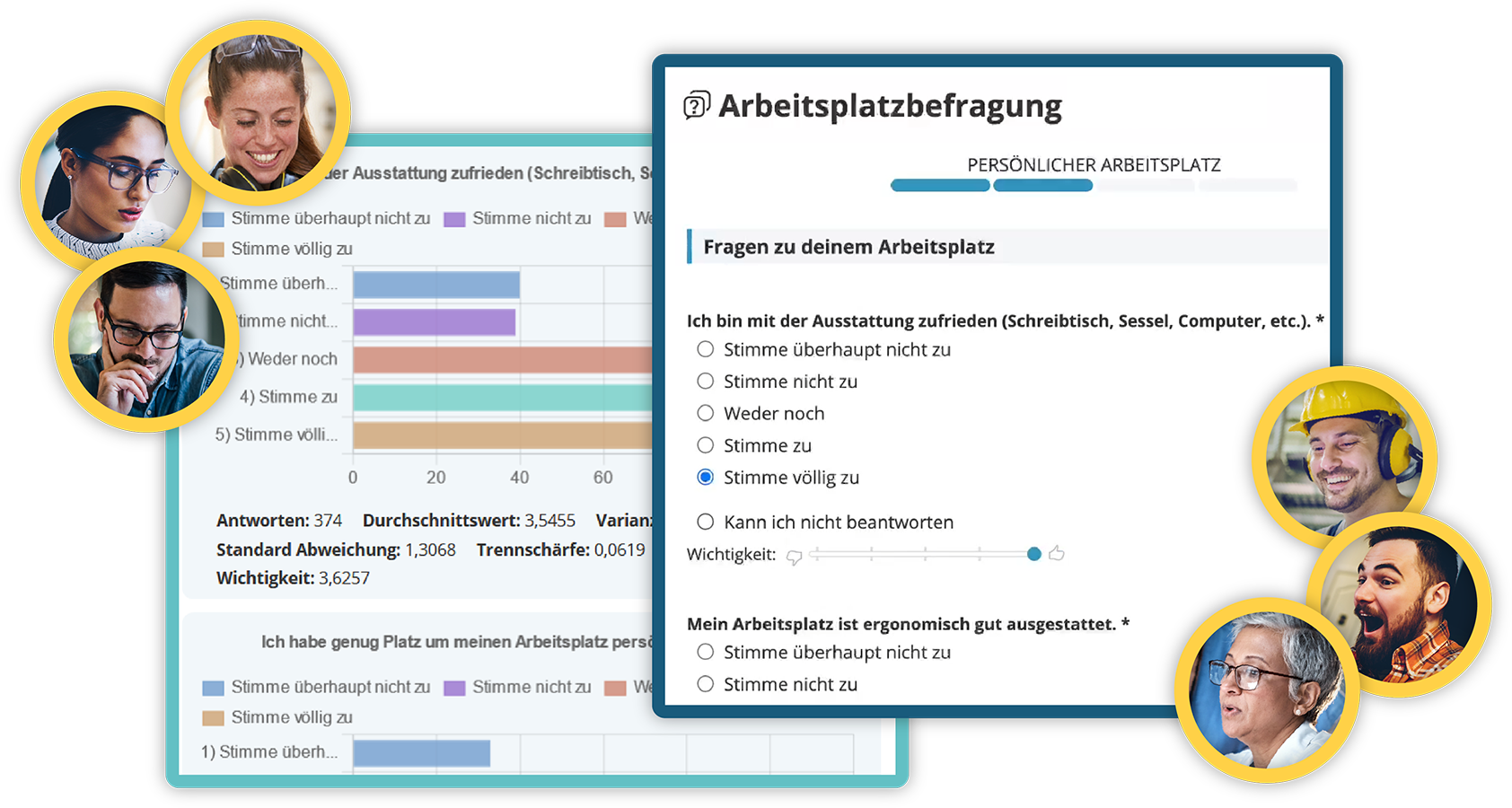
- Conduct polls & surveys and obtain policy acknowledgements
- Digitize and optimize internal procurement processes
- Deliver personal documents securely via the eBox to employees
- E-learning for fast onboarding & regular compliance checks
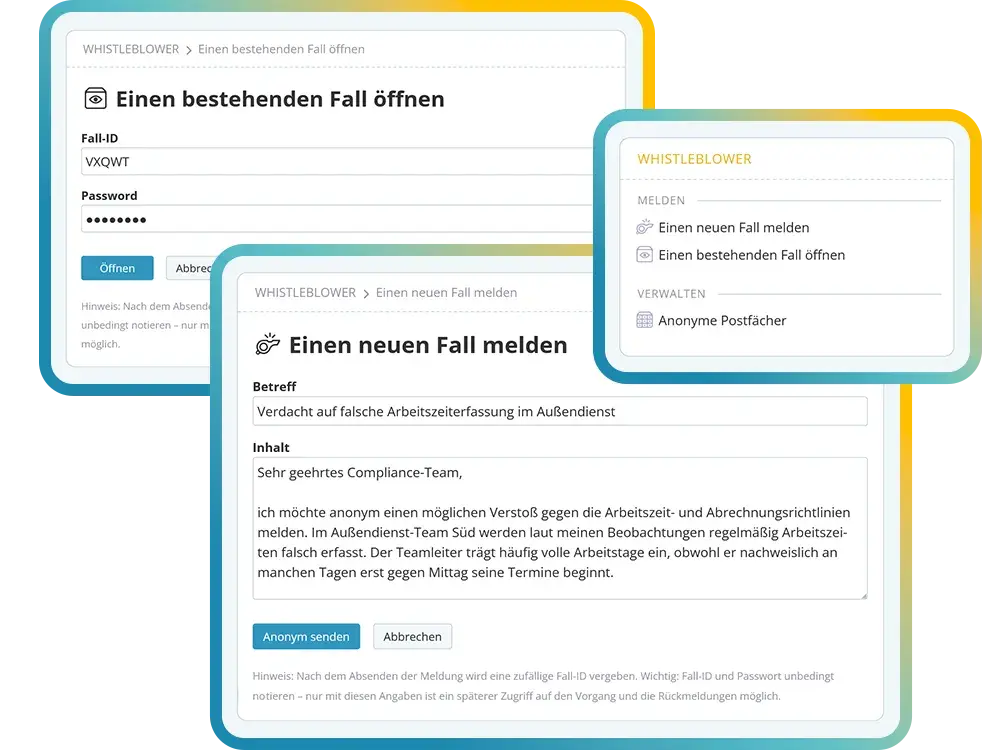
- Whistleblower tool for anonymous reporting
Why do organizations benefit from a Social Intranet Software?
The social intranet software creates clarity and alignment across the organization
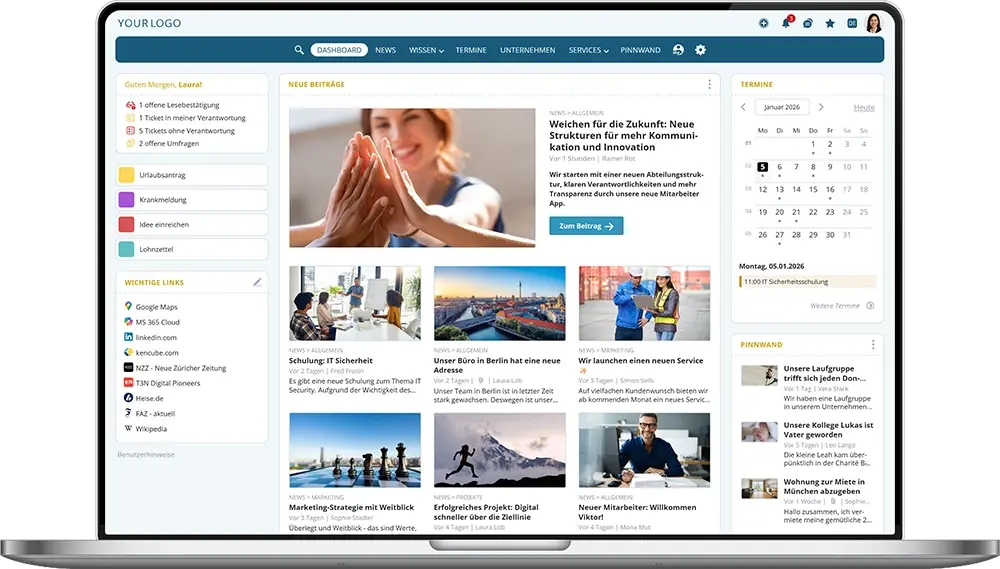
Connect. Inform. Collaborate. The social intranet is the central internal platform for digital communication, knowledge sharing, and collaboration. It connects people, departments, and locations and ensures that information is accessible anytime.
As a digital employee portal, the social intranet software strengthens communication, team spirit, and company culture across the entire organization. With features such as news feeds, comments, likes, and surveys, it actively promotes engagement and sustainably improves employee retention.
Two products in one software solution: KenCube is available via desktop browser and through the mobile employee app. See also: Employee App
.webp)
Welche Kriterien sind für den Betrieb einer Social Intranet Software in der EU maßgeblich?
EU-Hosting und digitale Souveränität als neuer Standard
Interne Kommunikation und Wissensverteilung sind geschäftskritisch. Wer seine Social Intranet Software bei einem Hyperscaler außerhalb der EU betreibt, unterliegt dem CLOUD Act und damit einem potenziellen Zugriff durch externe Behörden. Für ein DSGVO-konformes Intranet ist EU-Hosting deshalb heute keine Option mehr, sondern Pflicht. KenCube betreibt die Social Intranet Software ausschließlich in ISO 27001-zertifizierten Rechenzentren innerhalb der EU. Das ist vertraglich fixiert und durch technisch-organisatorische Maßnahmen abgesichert. Tägliche Backups und laufende Systemüberwachung gewährleisten einen stabilen und geschützten Betrieb.
Datenverarbeitung, Rollen und Compliance im Social Intranet
Die Social Intranet Software verarbeitet bewusst nur interne Unternehmensinhalte und Kommunikation, nicht aber besondere Kategorien personenbezogener Daten. Rollen, Rechte und Berechtigungskonzepte sind feingranular einstellbar. Ausgewählte Aktionen werden protokolliert, um Vorgänge bei Bedarf nachvollziehen zu können. Damit erfüllt die Social Intranet Software die Anforderungen von Datenschutz-Folgenabschätzungen und interner Compliance-Prüfungen in europäischen Unternehmen.
Wichtige Kriterien für den Betrieb einer Social Intranet Software in der EU
- DSGVO-konforme Datenverarbeitung in ISO 27001-zertifizierten EU-Rechenzentren
- Auftragsverarbeitungsvertrag (AVV) nach Art. 28 DSGVO inklusive
- Technisch-organisatorische Maßnahmen (TOM) dokumentiert und regelmäßig geprüft
- Keine Weitergabe an Drittländer, kein CLOUD-Act-Risiko
- Digitale Souveränität: volle Kontrolle über Daten, Infrastruktur und Anbieterwahl innerhalb der EU
- Souveräner IT-Betrieb, unabhängig von Big-Tech-Konzernen
- Flexibles Rechtesystem zur Steuerung der Schreib- und Leserechte
- Transparente Protokollierung ausgewählter Aktionen für Nachvollziehbarkeit
- Nutzbar auf Standardgeräten, BYOD-kompatibel
- Datensynchronisation mit bestehenden Systemen (z. B. Active Directory)
- Persönliche Betreuung und Schulungen aus Europa
What customers say about KenCube Intranet Software with Employee App
4.95 out of 5 stars from 45 reviews on independent platforms.
As of August 2026

News, Announcements & Team Updates
Share information with the social intranet software and keep everyone up to date
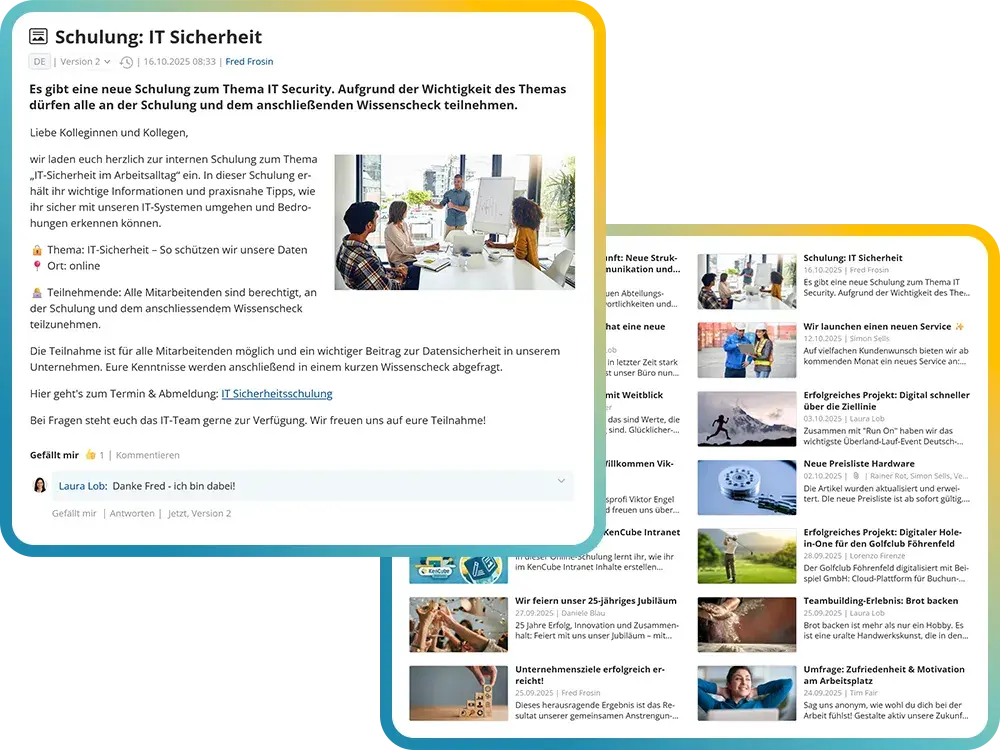
The social intranet software is the central platform for up-to-date company information. Whether executive messages, project announcements, or team updates – everyone stays informed.
Content can be pinned when needed or highlighted as breaking news. Depending on notification settings, employees receive updates via email, push notification, or as a bundled digest email.
Key communication tasks of a social intranet software:
- Publish company-wide news & announcements
- Create a digital “company magazine”
- Share circulars & success stories
- Communicate company strategy, benefits & corporate culture
- Pin content or highlight it as breaking news
- Request and document read confirmations
- Use AI-powered editorial tools for content creation
- Send digest emails or push notifications
Company Calendars & Appointment Bookings
Organize appointments and manage bookings directly in the social intranet software
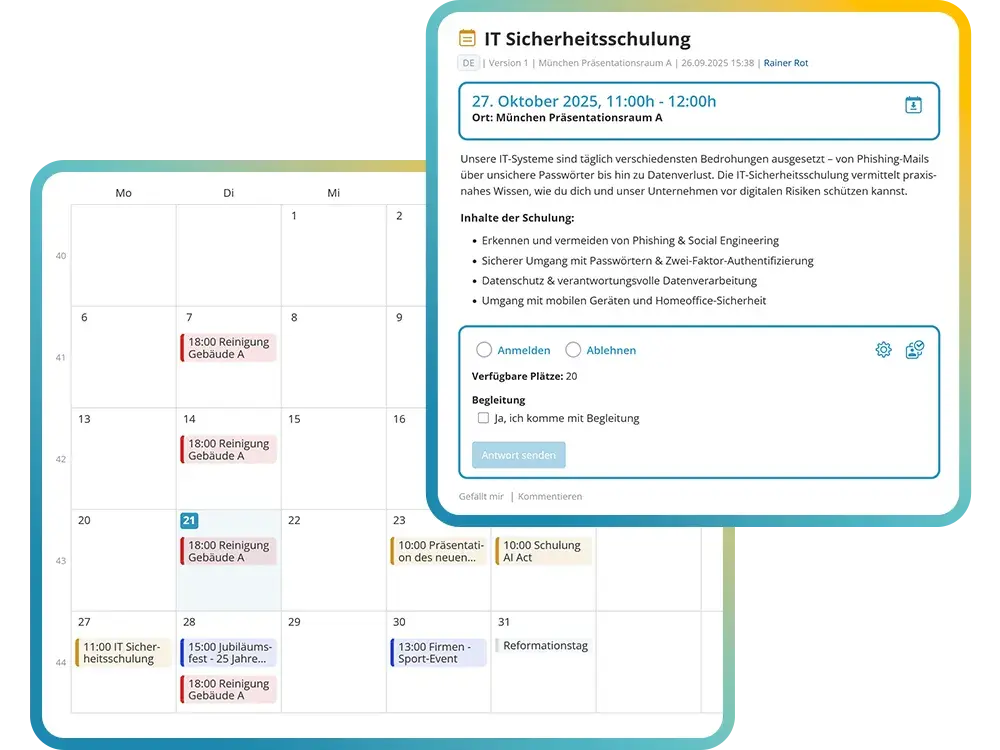
The social intranet offers flexible company calendars for various topics such as training sessions, events, health initiatives, or internal processes. Appointments can be created as single or recurring events and displayed in either calendar or list view.
The integrated booking system makes it easy to manage registrations for seminars, company events, or health appointments. For particularly important dates, read confirmations can be requested. Controlled access rights, synchronization with external calendars, and a clear interface ensure smooth organization.
Practical features for company calendars & appointment bookings in the social intranet:
- Create topic-specific company calendars (e.g. training, events, health)
- Create single and recurring appointments
- Integrated registration system for events & seminars
- Clear management of registrations and cancellations
- Synchronization with external calendars (e.g. Outlook, Google)
- Weekly internal email newsletter for upcoming events
One-to-One Chats & Group Chats
Communicate in a GDPR-compliant way within the social intranet software
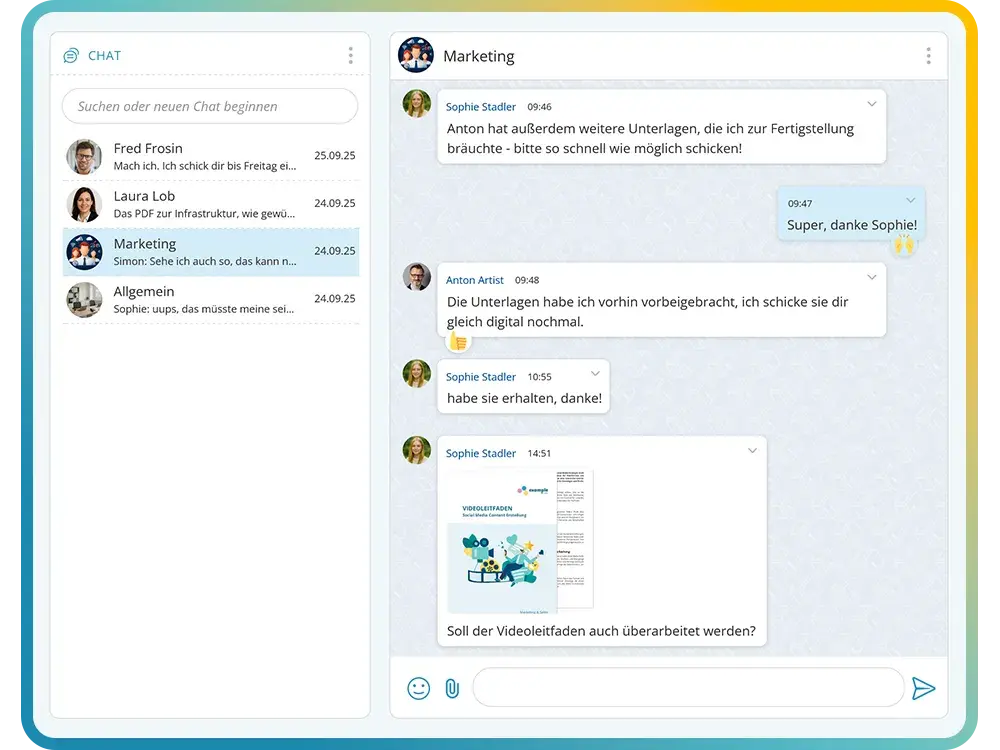
The social intranet offers a GDPR-compliant chat for fast and efficient communication within the organization – a secure alternative to email or SMS. It can be used both in the browser and on mobile via the employee app, including support for private devices (BYOD).
Both one-to-one and group chats enable direct and targeted communication. Groups can be created and managed intuitively, with a user experience similar to modern messaging services. Images, attachments, and emojis ensure a modern and interactive communication experience.
Key social intranet software features for internal chat:
- GDPR-compliant & secure communication within the organization
- Choice between one-to-one and group chats
- Available in the browser & via the mobile employee app
- Support for private devices (BYOD)
- Intuitive interface similar to modern messaging services
- Send images, attachments & emojis
- Direct linking to posts, documents & videos
- Individual control over chat access & permissions
Structured Knowledge & Know-How Management
Secure knowledge centrally and make it instantly accessible within the social intranet
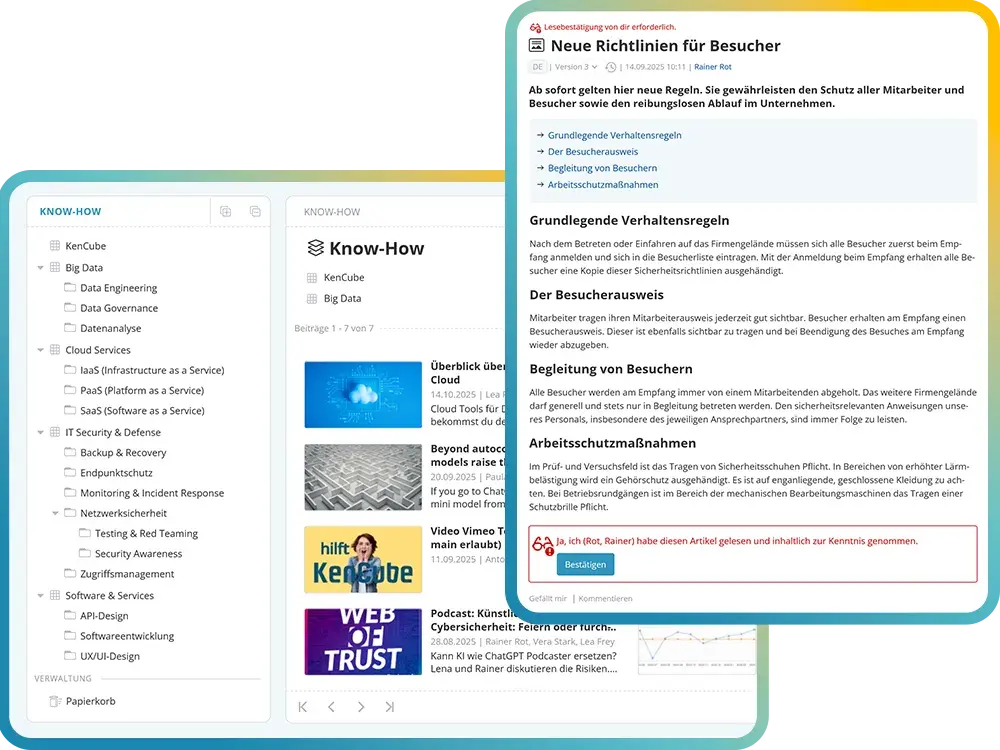
The social intranet functions as a digital knowledge platform. Manuals, guidelines, and policies are accessible at any time, while important changes can be formally acknowledged and documented with read confirmations. Onboarding materials help new employees get started quickly.
At the same time, centralized knowledge management within the social intranet ensures that valuable expertise remains in the organization – even when key employees leave.
Benefits and features for successful knowledge management in the social intranet:
- Central space for knowledge, expertise & research
- Manuals & guidelines (quality management)
- Onboarding materials for new employees
- Formal acknowledgement of important updates & policies
- Request and document read confirmations
- Content versioning including version comparison
- AI-powered editorial support tools
- Granular control of read and write permissions
- Tagging for structured content organization
- Intelligent search and filter options
- Collect feedback & improvement suggestions
Full-Text Indexed Document Management
Provide and find documents efficiently within the social intranet
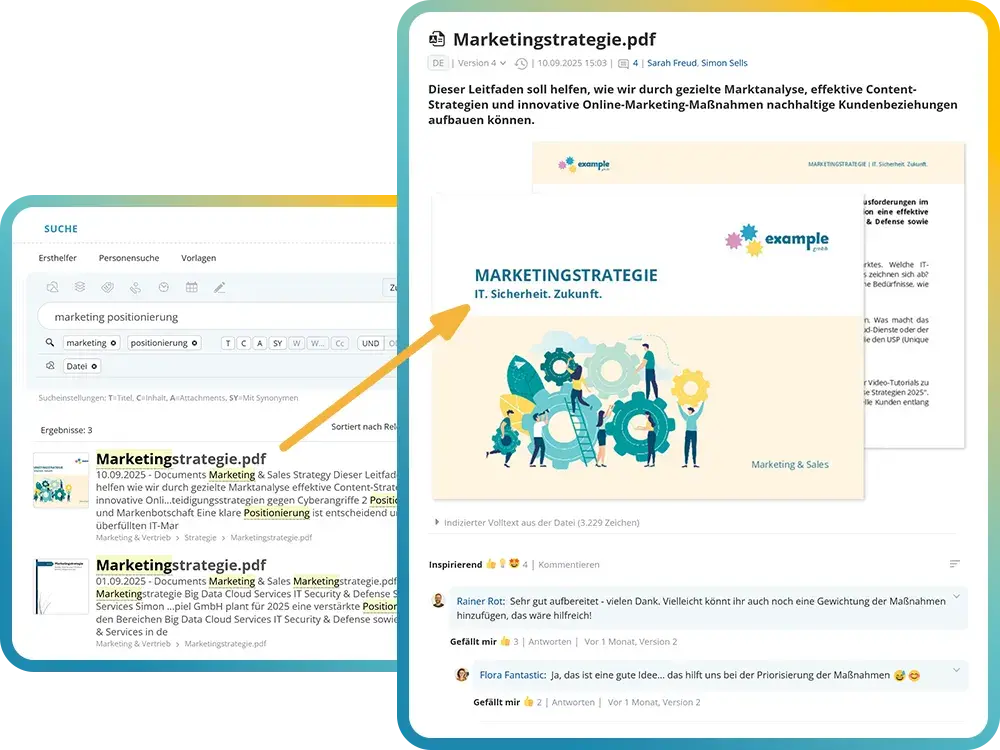
The social intranet enables structured storage of documents, templates, and files. Tagging, versioning, and granular permissions ensure that content remains organized, up to date, and secure. A powerful full-text search makes it easy to find information within document contents. Synchronization with external sources is also possible when required.
Key features of document management in the social intranet:
- Structured storage of documents, templates & files
- Tagging for thematic categorization and cross-referencing
- Full-text indexed search across document contents
- Versioning to track changes transparently
- Granular control of read and write permissions
- Synchronization with external sources and file systems
- Intelligent search and filter options
Employee Directory & Organizational Chart
Make your company structure transparent within the social intranet
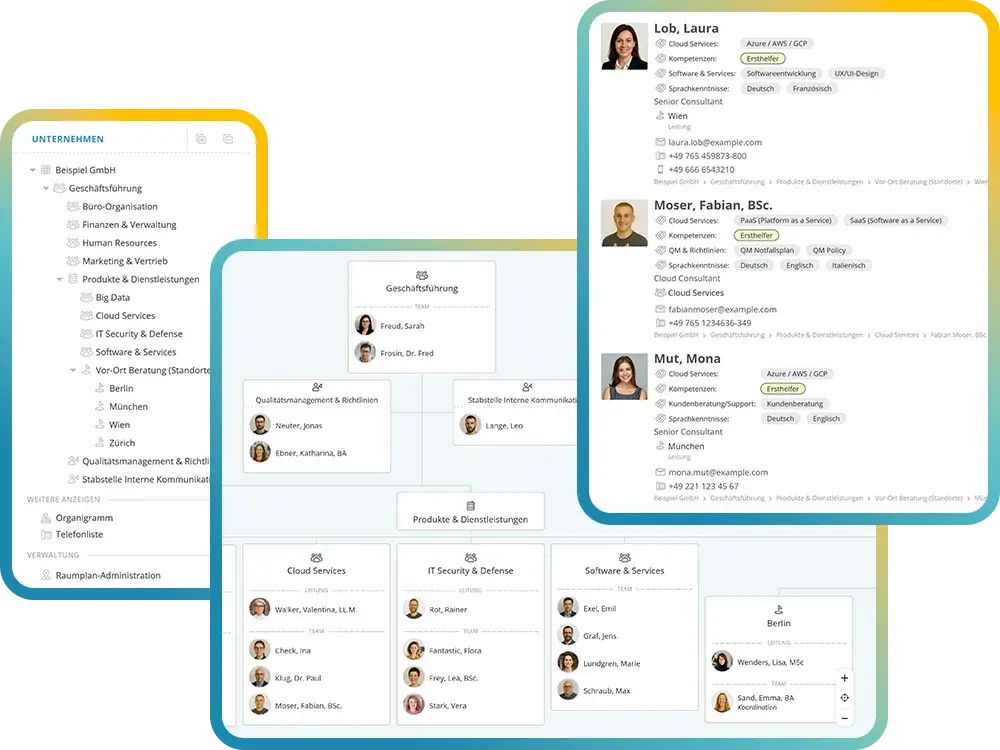
The social intranet makes the entire organizational structure visible – from executive management to departments and individual locations. A dynamic organizational chart displays hierarchical levels, responsibilities, and reporting lines, and can also be printed or exported when needed.
Employee profiles with contact details, roles, and qualifications make it easy to find expertise within the organization. Floor plans, an integrated one-to-one and group chat, and a quick search function ensure fast orientation and direct communication.
User accounts can be synchronized with external systems, and login is conveniently handled via Single Sign-on (SSO). This ensures seamless integration into your existing IT landscape.
Key social intranet features for colleagues & organizational structure:
- Hierarchical company structure
- Display of locations, departments & leadership roles
- Descriptions of business units
- Organigram: Dynamic organizational chart with print and export functions
- Employee profiles with contact details & responsibilities
- Tag-based skills and qualifications
- Floor plans for on-site orientation
- Synchronization with external systems (e.g. MS Azure, Google Workspace)
- Login via Single Sign-on (SSO) using an identity provider (IdP)
- Integrated one-to-one and group chat
- Quick search for people & responsibilities
Digital Forms & Internal Service Requests
Submit requests and manage workflows within the social intranet
The social intranet enables the easy use of digital forms and internal service requests across all areas of the organization. Employees can send sick leave notifications or vacation requests directly to HR, submit IT helpdesk tickets, or report incidents including photo attachments. Ideas and improvement suggestions can also be captured easily and managed centrally within the social intranet.
Each submitted form automatically generates a ticket that is assigned to the responsible team. Follow-up questions can be asked and answered directly within the ticket, ensuring that processes remain transparent and traceable. Tasks are handled within the responsible teams, based on availability and defined responsibilities.
Key social intranet features for digital forms & internal service requests:
- Send sick leave notifications & vacation requests directly to HR
- Capture ideas & improvement suggestions within the social intranet
- Submit IT helpdesk tickets & incident reports
- Create different ticket channels with customized input forms
- Automatic ticket creation upon form submission
- Assign responsibilities within teams based on availability
- Ask and respond to follow-up questions directly within the ticket
Polls & Surveys
Gather feedback and make opinions visible with the social intranet
The social intranet provides simple ways to collect feedback and opinions directly from employees. Quick polls are a practical tool to capture sentiment and support decision-making on a broader basis. Polls can be integrated directly into posts and may include multiple question blocks. Participation can be set to anonymous or personalized.
Practical features for surveys & polls in the social intranet:
- Collect employee feedback & opinions
- Enable anonymous or personalized participation
- Configurable participation timeframes
- Capture demographic data
- Rate and prioritize questions by importance
- Filter options, benchmark & portfolio analyses
- Analyze results in full compliance with GDPR
- Export data for external processing
Whistleblower Tool
Provide a legally compliant whistleblowing system within the social intranet
The integrated whistleblower module enables fully GDPR-compliant and anonymous reporting of misconduct and violations within the organization. The system is aligned with the requirements of the EU Whistleblower Directive (2019/1937) and supports organizations in meeting their legal obligations.
Reports are submitted via secure and anonymous mailboxes. Responsible persons or teams are automatically notified upon receipt. The system allows protected two-way communication while preserving anonymity.
A legally compliant workflow guides case handling in accordance with mandated response deadlines and documentation requirements, ensuring transparency, traceability, and regulatory compliance.
- Anonymous and secure reporting channels
- Compliance with the EU Whistleblower Directive (2019/1937)
- Automatic notification of the responsible whistleblower team
- Protected two-way communication with anonymous reporters
- Workflow aligned with statutory response deadlines
- Secure documentation and audit trail
Social Intranet Software auswählen: Worauf KMU beim Vergleich achten sollten
Die wichtigsten Entscheidungskriterien für eine zukunftsfähige Intranetlösung
Die Auswahl einer Social Intranet Software ist eine strategische Entscheidung für die nächsten fünf bis zehn Jahre. Mitarbeitende müssen die Plattform täglich nutzen, Inhalte müssen migrierbar bleiben und der Anbieter muss langfristig verfügbar sein. Entscheidend ist auch, wie breit der Funktionsumfang bereits im Standard ausfällt und wie flexibel sich die Intranetlösung an die eigenen Abteilungen, Teams und Prozesse anpassen lässt.
Ein maßgeschneidertes Intranet entsteht selten durch aufwändige Sonderentwicklungen, sondern durch einen klugen Baukasten. Aus einem großen Pool an Kernfunktionen wählt jedes Unternehmen seine eigene Mischung. Neue Features lassen sich später schrittweise aktivieren, ohne dass ein zweites IT-Projekt aufgesetzt werden muss. Genau diese Flexibilität hält das Intranet lebendig und begeistert Mitarbeitende dauerhaft.
Für KMU besonders relevant: Eine Social Intranet Software sollte ohne Berater live gehen können. KenCube stellt dafür strukturierte Onboarding-Pakete und deutschsprachigen Support bereit. Zudem ergänzt die integrierte Mitarbeiter-App das Social Intranet um mobile Reichweite, gerade für Non-Desk-Workers in Produktion, Handel, Pflege und Handwerk.
Checkliste: Social Intranet Software im Vergleich:
- Ist der Funktionsumfang bereits im Standard groß genug, um unterschiedliche Abteilungen zu begeistern?
- Lässt sich die Intranetlösung modular konfigurieren und schrittweise um weitere Features erweitern?
- Können einzelne Bereiche eigene Inhalte, Formulare und Abläufe ohne IT-Unterstützung gestalten?
- Ist die Preisgestaltung transparent nach dem Flatrate-Prinzip statt mit Einzelmodul-Aufschlägen?
- Gibt es eine Mitarbeiter-App für Non-Desk-Workers ohne Aufpreis?
- Wie schnell ist die Intranetlösung produktiv: Wochen oder Monate?
- Ist die Social Intranet Software in der EU gehostet und AVV-konform?
- Unterstützt der Anbieter einen DSGVO-konformen Rollout mit fertigen Vorlagen und Dokumentation?
Explore KenCube
We would be happy to present our Social Intranet Employee App Software to you in a no-obligation online demo.
If you are interested, we can also provide you with access to a free trial version.
Warum profitieren Unternehmen von einer Social Intranet Software?
Die Social Intranet Software schafft Klarheit und Orientierung im Unternehmen
Verbinden. Informieren. Zusammenarbeiten. Als digitales Mitarbeiterportal stärkt die Social Intranet Software den Austausch, den Zusammenhalt und die Unternehmenskultur. Mit Pinnwand, Kommentaren, Likes und Umfragen wird das Engagement gefördert und die Mitarbeiterbindung nachhaltig gestärkt.
Modular, DSGVO-konform und EU-gehostet: Die Social Intranet Software von KenCube ist die zentrale interne Plattform für digitale Kommunikation, Wissen und Zusammenarbeit. Sie wird ausschließlich in ISO 27001-zertifizierten Rechenzentren in der EU betrieben und ist auf die Anforderungen von KMU, mittelständischen Unternehmen und Organisationen in Europa zugeschnitten.
Zwei Produkte in einer Softwarelösung: KenCube ist sowohl über Desktop-Browser als auch über die mobile Mitarbeiter-App nutzbar, siehe auch: Mitarbeiter-App