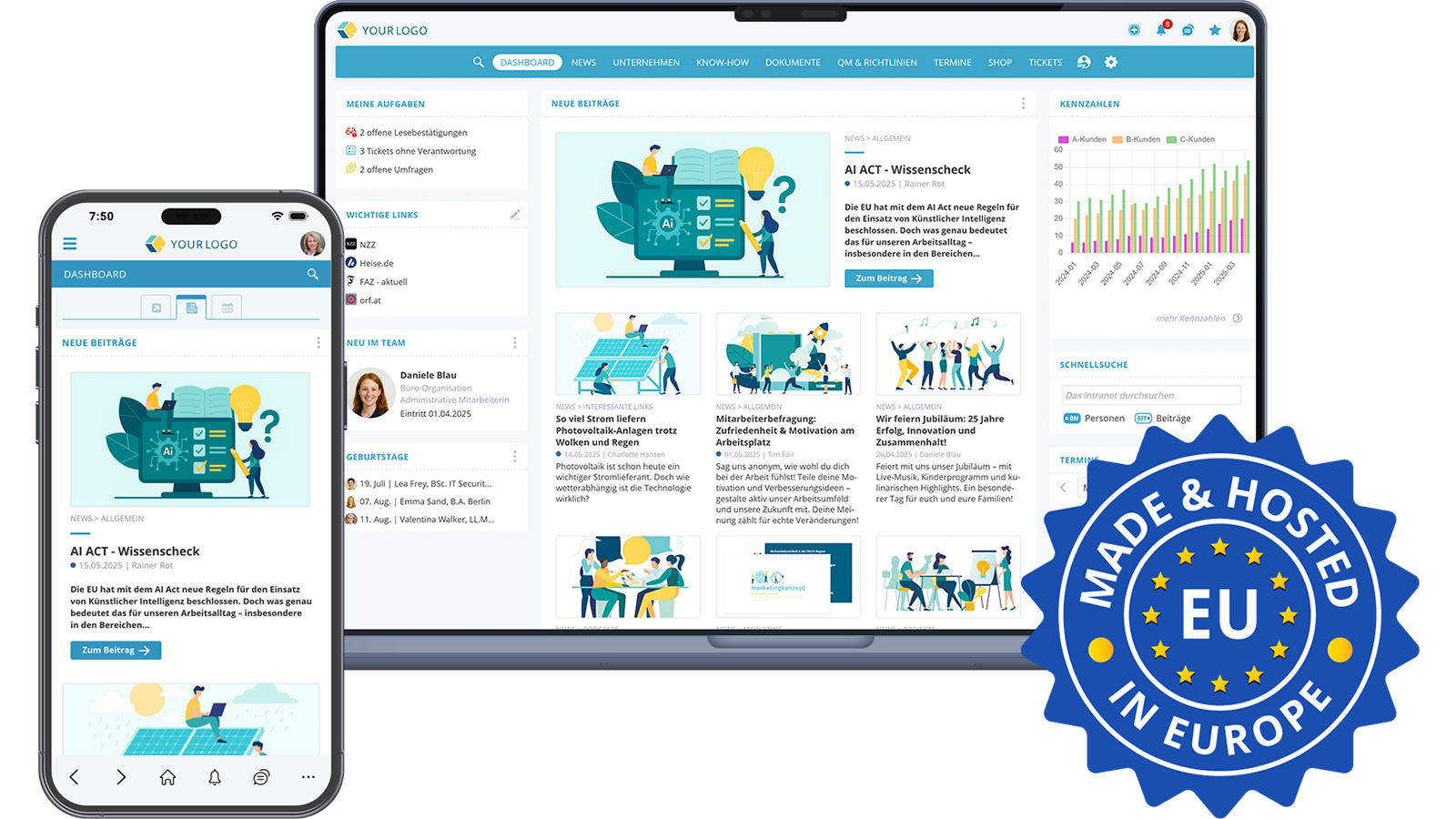

Social intranets and employee apps are typically offered in modern solutions as two access points to a single platform. Both share the same content, permissions and data, but are optimised for different work situations. Office staff use the app as a second channel while on the move, whereas colleagues without a permanent desk workplace can fall back on the desktop when needed. This bracket influences many of the technical decisions described below.
From an IT perspective, this article summarises what to look out for when selecting an intranet solution, which decisions need to be made, and which tasks IT will face when an intranet is newly introduced in a company.
1. Why the IT department plays a central role in introducing an intranet
An intranet is a long-lived platform, in use for an average of five to ten years. Those who look exclusively at the wishes of marketing, HR or management risk later friction points: unmet data protection requirements, missing interfaces, poor scalability or a permissions system that does not stand up to organisational realities. In addition, McKinsey found that around 70% of transformation programmes fail due to unclear governance, not technology (McKinsey, Common pitfalls in transformation, 2022)
The IT department brings three perspectives that are often missing in the early selection phases: technical risk assessment, integration into the existing IT architecture, and a view of long-term operations. IT managers who are involved in decision-making processes early on lay the foundation for a platform that runs stably in the long term and at the same time meets the requirements of the specialist departments.
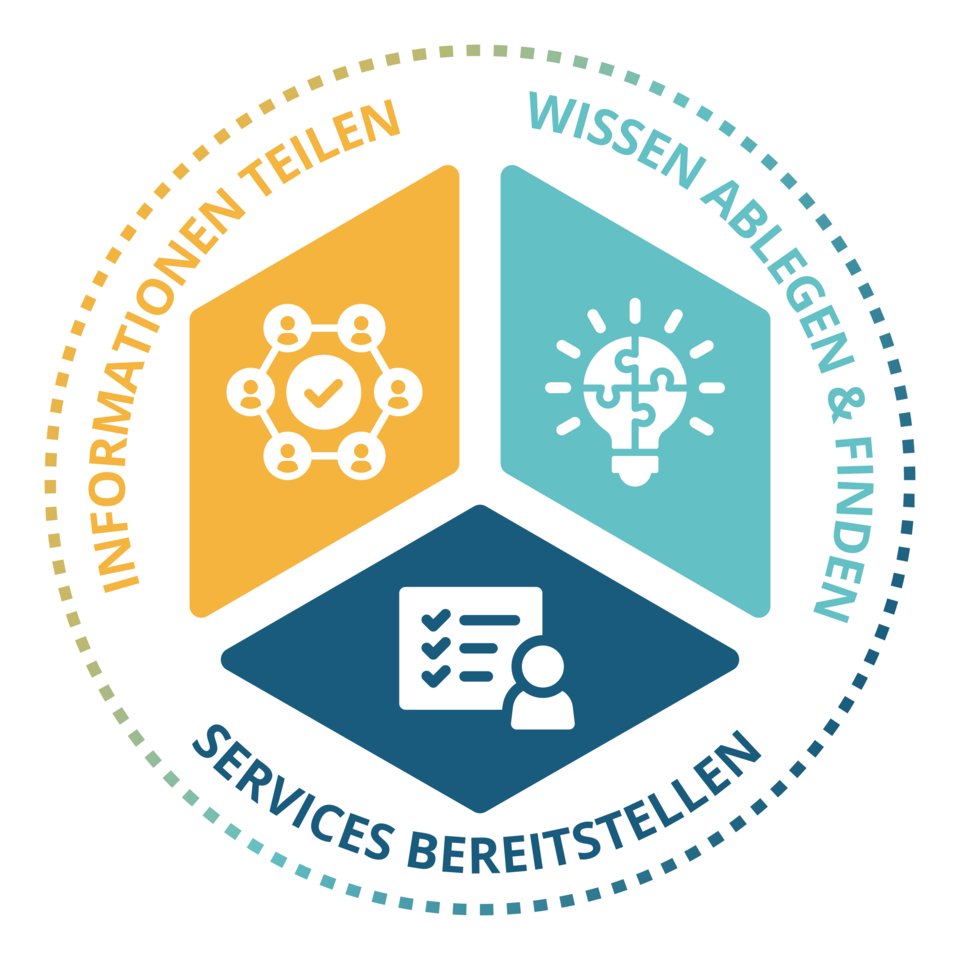 The main functions of an intranet can be divided into three categories
2. What should IT look out for when selecting an intranet solution?
From an IT perspective, a structured requirements review along the following seven criteria is worthwhile.
2.1 Functional scope and practical suitability
An intranet is only used in everyday work when every employee finds their own reason to open it daily. A broad selection of features from day 1 increases acceptance and reduces later discussions about licences or modules. Important aspects include:
- News, knowledge and documents in a searchable platform
- Functions for internal services such as tickets, forms, bookings or internal procurement
- Social functions (likes, comments, surveys) and chats for lively communication
- Permissions, roles and notifications that can be used without additional modules
- Licence model based on a flat rate, so that functions do not have to be unlocked individually
2.2 Data protection, security and compliance
Data protection is non-negotiable. Internal company content and communication, confidential documents, personal payslips in the mail inbox or anonymous tips in the whistleblower tool must be processed in compliance with the GDPR (BSI minimum standard for the use of external cloud services and Criteria catalogue C5 of the German Federal Office for Information Security - BSI). A modern intranet solution should therefore meet the following requirements:
- Hosting in Europe, ideally in ISO 27001-certified data centres in the EU
- Single-tenant architecture, where each application runs as its own instance. This reduces the risk of data crossover and simplifies compliance arguments.
- Multi-layered security concept with firewall, intrusion detection, regular virus scans and system health monitoring
- Daily, geographically separated backups
- Protected login with optional two-factor authentication (email or authenticator app)
- Biometric control in the employee app. For sensitive applications, client certificates (TLS) can additionally be used for extended access protection.
.webp "KenCube Employee App: Made & Hosted in Europe (EU)") KenCube Employee App: Made & Hosted in Europe (EU)
KenCube Employee App: Made & Hosted in Europe (EU)2.3 Hosting model
When it comes to hosting, there are essentially three options:
- Cloud managed hosting by the provider: updates, patches, backups and monitoring are included in the service. For most companies, the most economical and secure option.
- VPS (Virtual Private Server) as a middle ground: more strongly isolated operation, suitable for companies with increased compliance requirements.
- On-premises: in-house operation on your own hardware. Maximum control, but also maximum effort. Security, updates, availability and scaling are entirely your own responsibility.
2.4 Identity management and Single Sign-On
A modern intranet solution must fit into existing identity management. Relevant from an IT perspective:
- Synchronisation with common identity providers such as Microsoft Entra ID, Google Workspace or other IdPs
- Single Sign-On (SSO), ideally standards-based via SAML or OpenID Connect
- Two-factor authentication as an optional second factor (see the Microsoft Security article on multi-factor authentication - MFA)
- Option to allow different authentication methods per user group, for example SSO for internal employees and direct login for external partners
- GDPR-compliant deletion of user master data and controlled offboarding
2.5 Interfaces and integrations
An intranet only realises its value when it is integrated into the rest of the IT landscape. Important aspects:
- Standard interfaces for identity providers, image databases (e.g. Pixabay) and AI providers (e.g. OpenAI, Mistral, Anthropic Claude)
- Integration with translation services such as DeepL for multilingual content
- Option to connect other third-party systems via custom import interfaces, for example for personnel master data, personal documents or table synchronisation
- Extensibility via custom widgets or specialised modules
2.6 Mobile, employee app and BYOD
Classic desktop intranets today often reach only part of the workforce. Production, field service, care or logistics work primarily on mobile. McKinsey estimates that around 2.7 billion people worldwide belong to the "deskless workforce", meaning they do not have a desktop workplace. That is approximately 80% of the global workforce (McKinsey Technology Trends Outlook, 2022). From an IT perspective, the following points should be checked when commissioning an employee app:
- Native employee app for iOS and Android, on smartphones and tablets
- Optional: white-label app that appears in the app store under your own name and logo
- BYOD capability (Bring Your Own Device) including an additional security layer through biometric control
- Parallel delivery across multiple channels: app push, browser web push, email and info screens in 16:9 format
2.7 Permissions concept and roles
The larger the organisation, the more important a flexible permissions system becomes:
- Area managers for content administration of individual intranet areas
- Different editorial models, from the Wikipedia principle "Everyone is an editor" through the classic "Readers/Editors" structure to the four-eyes principle with editor-in-chief
- Restrictable read and access permissions down to article and document level
- Ability to map tenant structures for company groups and corporations ("intranet within an intranet")
2.8 Scalability, maintenance and service level
Finally, ongoing operations also belong in the evaluation:
- Update strategy with centralised, regular updates without maintenance effort on the customer side
- Service Level Agreement (SLA) with clearly defined response times
- Availability of personal support and a ticket system
- Scalability with growing user numbers, additional locations or new tenants
3. Which decisions does the IT department need to make?
The criteria mentioned above result in concrete decisions that should be prepared during the selection and implementation process. From an IT perspective, the following points belong at the top of the agenda:
- Define the hosting model. Cloud managed hosting at the provider, VPS or on-premises, with clarity about responsibilities, availability, data location and costs.
- Define the identity strategy. Which IdP is used (Entra ID, Google Workspace or another directory)? Will SSO be used, or does a mixed strategy apply with an authentication switch that allows SSO or direct login depending on the user group? What does the 2FA policy look like?
- Permissions and roles concept. Which intranet areas exist, who is allowed to administer, read and write there? Which editorial model fits the organisation: "Everyone-is-an-editor", "Readers/Editors" or "Readers/Editors/Editors-in-chief"?
- Define app platforms. Should employees be reached via iOS and Android, both platforms in parallel? Will a standard app from the provider be used or a custom white-label app in the app store? With white label, it must be clarified who is responsible for branding, descriptions, screenshots and store submission.
- App distribution and rollout. How will the app be rolled out to employees? Via the public app stores, via Mobile Device Management (MDM) or as a BYOD installation on private devices? Which onboarding materials (guides, QR codes, push strategy) does the rollout require?
- Update and maintenance strategy. Who handles updates and patches of the server and application layer? How often are releases deployed, and are there maintenance windows? With cloud managed hosting, this responsibility lies with the provider, with on-premises it lies with your own team.
- Interface roadmap. Which systems should be integrated from day 1, which later (e.g. image database, AI provider, DeepL, custom import interfaces for personnel master data or personal documents)?
- Data protection and security policies. Which policies will be delivered via the intranet and must be acknowledged with a read confirmation? Which data protection notices are relevant for the workforce?
- Test and production environment. Should a test system be operated in parallel with the production system, for example to check integrations or major updates risk-free? This decision strongly depends on the size and complexity of the organisation (see practical tips).
- Domain, certificates and notifications. Will a custom subdomain (e.g. intranet.company.com) be used? Will a provided SSL certificate be installed or the provider certificate used? Can notifications be sent by email with a custom sender address?
These decisions should be made together with the specialist departments (communications, HR, management). IT contributes the technical assessment and risk evaluation.
4. The IT department's tasks when introducing a new intranet
Once the solution has been selected, the actual work begins. A structured implementation process in six phases has proven effective. In each of these phases, IT has clearly defined tasks.
Phase 1: Kick-off workshop and requirements review
In the kick-off with the provider, the technical cornerstones are agreed. IT contributes the following here:
- Requirements for Single Sign-On, IdP integration and authentication methods
- Specifications for domain, SSL certificate and custom mail address
- Questions about interfaces and the integration of third-party systems
- Data classification guidelines that need to be reflected in the permissions system
Phase 2: Technical installation and initial configuration
In this phase, most of the work lies with the provider. However, IT accompanies critical points:
- Server setup and system installation
- Initial configuration of interfaces (IdP synchronisation, AI providers, image database)
- If required, creation and store submission of the white-label app
- Verification of security and network settings (IP whitelisting, firewall rules, client certificates if applicable)
 Technical installation and basic configuration are largely the provider's responsibility. However, IT can assist with critical points.
Phase 3: "Structure & Content" workshop as a bridge
Even though this workshop primarily concerns the editorial team, IT should be involved. Permissions concepts, the synchronisation of user groups from the IdP, the creation of intranet areas and the initial configuration of notifications are the interface between the specialist department and technology.
Phase 4: Adding content and IT-side fine-tuning
While the editorial team creates the initial content, IT takes care of:
- Fine-tuning of synchronisation and maintenance of master data
- Ad-hoc topics such as additional interfaces, table imports, integration of telephony and online meetings (e.g. MS Teams or Google Meet as deep links on person cards)
- Configuration of notifications and digest emails as well as, if required, the weekly newsletter
Phase 5: Final check and test run
Before going live, IT should ensure that the following points run cleanly:
- Successful login via SSO and 2FA for all pilot users
- Correct synchronisation of user master data and groups from the IdP
- Working notifications across all channels (push, app, browser, email)
- Availability of the app in the app stores (with white label)
- Active backup and monitoring processes
Phase 6: Go-live and operation
At production launch, IT is the first point of contact for technical queries and monitors the initial login rush. After that, regular operation begins with the following tasks:
- Monitoring of performance, availability and login statistics
- Onboarding of new employees via user administration, for example via first-login one-time password, batch invitation or CSV export
- Evaluation of usage statistics (frequent search terms, popular content, app vs. browser share), both for the editorial team and to optimise the IT strategy
- Support for sensitive workflows, for example in the whistleblower inbox or for mandatory read confirmations
5. Practical tips for a smooth rollout
From over 25 years of experience with intranet projects, a number of practical tips have proven useful that make IT's work considerably easier.
Clarify the identity base early. Who is in which group, who has which role profile? This is the fundamental basis for everything that happens later in the permissions concept. A well-maintained directory saves many days in the rollout phase.
Pilot group before the company-wide rollout. A small, diverse pilot group (office, production, field service) uncovers significantly more issues than any internal test. It is also the ideal source of feedback on usability and notification behaviour.
Clear responsibilities between IT, communications and HR. An intranet rarely fails due to technology, but rather due to unclear governance. Who maintains which content, who manages which intranet areas, who is the contact person for the workforce?
Use a test system only where it makes sense. A parallel test system is not always feasible for SMEs due to tight resources and additional costs. With more complex solutions involving many interfaces, tenants or a high frequency of changes, however, a test system is worthwhile to check updates and integrations risk-free. For smaller setups, a well-documented maintenance window process on the production system is often sufficient.
Consider mobile use from the outset. Push strategy, login on private devices and biometric protection are topics that appear late in many projects. This delays the onboarding of non-desk employees.
Rely on a reliable provider with European hosting. GDPR-compliant operation in ISO 27001-certified data centres in the EU, a single-tenant architecture and independence from Big Tech corporations significantly reduce compliance risks and simplify the argumentation vis-à-vis data protection officers and works councils.
6. FAQ: Frequently asked questions from an IT perspective
Which technical requirements should a modern intranet solution meet?
In addition to functional aspects such as news, documents, calendar and search, the following are decisive from an IT perspective: GDPR-compliant hosting in the EU, ISO 27001 certification of the data centres, Single Sign-On via standard IdPs (Entra ID, Google Workspace), two-factor authentication, regular backups, a flexible permissions system and standard interfaces for identity management, AI and translation.
Cloud managed hosting or on-premises: which is the better choice?
For most companies, cloud managed hosting at the provider is the more economical and secure option: updates, patches and monitoring are included, and the responsibility for security lies with the specialised provider. On-premises only makes sense if there are clear regulatory reasons or existing infrastructure that speak in favour of it.
What role does Single Sign-On play in introducing an intranet?
SSO is the standard today. It reduces password friction, improves security through centralised policies and increases acceptance because employees do not have to remember additional credentials. In practice, the pure SSO path is not always sensible. With an authentication switch, SSO and direct login can be combined, for example SSO for internal employees with an IdP account and a separate login for external partners, seasonal staff or pilot users. SSO should therefore be mandatorily examined in the selection phase, including the question of how a mixed strategy can be technically mapped.
How is an intranet operated in compliance with the GDPR?
GDPR-compliant operation is based on several pillars: hosting in a European, ISO 27001-certified data centre, a single-tenant architecture, processing only of truly necessary master data, clear deletion and retention concepts, and transparent data protection policies that can be communicated directly in the intranet and acknowledged with a read confirmation.
How much time should IT plan for the introduction?
Depending on size and complexity, a few weeks are sufficient for a standard project if an experienced provider supplies a structured basic setup with kick-off, technical installation, workshops and go-live support. For larger projects with multiple tenants, many interfaces and a white-label app, the time required is correspondingly higher.
What tasks does IT have after go-live?
Main tasks include monitoring performance and availability, continuous maintenance of user administration, evaluating usage statistics, supporting new interfaces or modules, and close coordination with the editorial team and communications when new requirements arise.
What is the difference between an employee app and a classic intranet?
Both are two access points to the same platform and share content, permissions and data. The social intranet is the editorial and admin access, ideal for longer articles, evaluations or maintaining the knowledge base. The employee app is the mobile everyday channel for employees who are not, or not constantly, at the desk. From an IT perspective, it is important that both access paths work on the same data basis and are controlled via the same permissions, notifications and security mechanisms.
7. Conclusion: IT as the key to a successful intranet
An intranet today is far more than a news board. It is the digital home of the workforce and a central component of the IT architecture. Careful selection, clear decisions on hosting, identity management and interfaces, as well as a well-structured introduction are the prerequisites for this platform to run reliably in the long term and provide added value within the company.
IT managers who actively shape this process rather than merely accompanying it lay the foundation for a modern, secure and accepted solution. With an experienced provider at their side, their own workload is also reduced to the essentials: the strategic decisions.
About the KenCube Intranet Suite
KenCube is a social intranet software with an integrated employee app for SMEs and organisations in Europe. The platform offers a wide range of functions as a flat-rate building-block system. Almost all functions are included as standard from day 1, from news, knowledge and documents to tickets, bookings and internal procurement, through to chats, surveys and a whistleblower tool. Instead of purchasing individual modules, companies can activate functions step by step as they are needed.
The solution has been developed in Europe for over 25 years and is hosted in ISO 27001-certified data centres in the EU. It runs as a standalone single-tenant application and comes with standard interfaces for identity providers, AI providers and translation services. On request, an experienced team accompanies the introduction with a structured basic setup from kick-off to go-live.
Try it now free of charge or request an online demo. We will be happy to show you what a modern intranet can look like in your company too.

Working as a consultant in the IT industry for over 30 years, specialist in software development, AI-supported data processing and neural networks, studied at WU Vienna
 Praktische Feature-Auswahl