Skip to content
KenCube Suite
Share information, provide knowledge

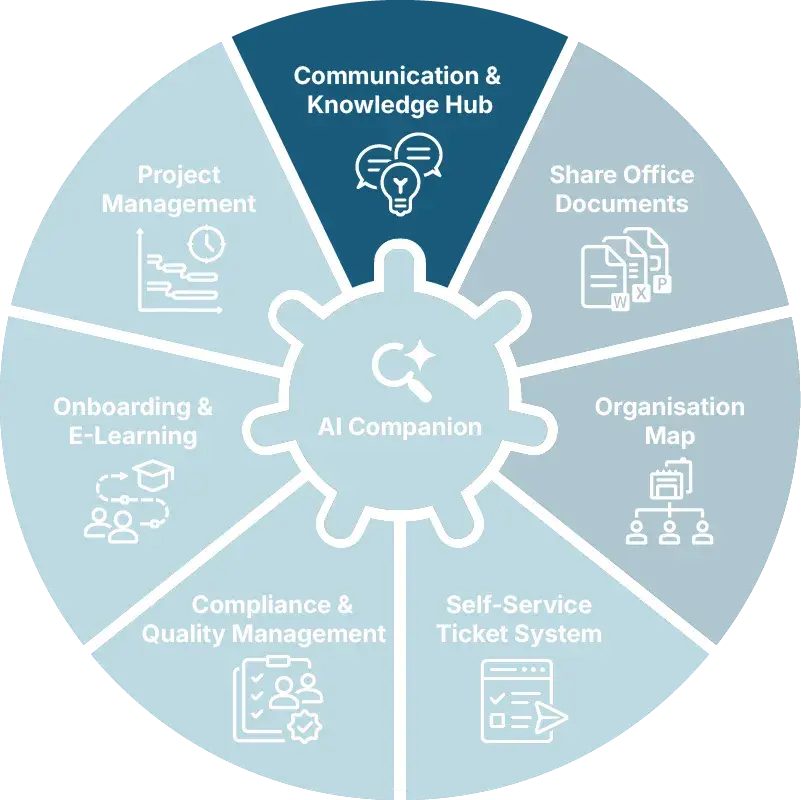
Communication & Knowledge Hub

In KenCube, news, company knowledge, appointments and conversations come together on one central platform. Information reaches all employees in a targeted and reliable way, at the desk as well as on the go via the employee app.

  • GDPR-compliant, EU-sovereign
  • Cyber Trust Austria/Europe Label
KenCube Digital Workplace · Core module
Modules-Top-News-Know-how-DE-v01.webp
KenCube-Communication-Knowledge-AC-01.webp
CORE MODULE COMMUNICATION & KNOWLEDGE HUB

Functions at a glance

  • News and knowledge with scheduled publication
  • Optional review by the editor-in-chief
  • Workspaces, tags, glossary and Power Search
  • Push, pop-up, breaking news and read receipts
  • Comments, reactions and polls
  • Appointments with registration and waiting list
  • Multilingual content, with DeepL if desired
  • GDPR-compliant one-to-one and group chats

The core module Communication & Knowledge Hub is a fixed part of the KenCube Suite. The chat function can be enabled per user.

Optionally available:

  • Info screens (add-on)
  • Crisis and emergency communication (add-on)

box-woman-relax.webp

Reach everyone reliably

News reaches the entire workforce, at the desk as well as on the go in the KenCube app. The dashboard provides a quick overview.

When a read receipt is requested, it is clear who has taken note of an important piece of information.

box-construction-man-helmet.webp

Provide structured knowledge

Policies, guides and expertise are kept in one place, easy to find for everyone who needs them. Each department maintains its own content.

Search finds what you are looking for even when the exact terms are missing. Technical terms are explained directly in the text.

box-two-female-doctors.webp

Encourage exchange and participation

Comments, reactions and polls support dialogue within the company. The privacy-compliant chat can be used for questions.

Appointments are listed in the shared calendar, with registration handled right there.
DIF
WPH
LWA
NOV
MDC
KHW
THI
Admiral
SWN
COM
LRA
FBS
SBH
ETL
AZK
SAN
SBA
ALP
POE
LEH
DTV
HWK
BLA
VIM
BAR
BMG
BLB
MOL
MON
LTW
WEY
SMZ
REY

Digital platform for internal communication and company knowledge

The Communication & Knowledge Hub is the KenCube core module for internal communication and company knowledge. News, knowledge articles, appointments and chats come together here. In this central place, all employees find what they need to know, in the browser and in the KenCube app, even without a fixed PC workstation or their own company e‑mail address.

Deliver announcements to the right audience

Editorial teams and departments publish posts with text, images, video, audio and links as well as processes shown as diagrams. They do this in workspaces for departments, locations or topics. The read permissions of the workspace determine who sees an announcement, so no separate recipient list is needed. On request, an editorial approval step per workspace ensures that only reviewed posts are published. Publication and automatic unpublishing can be scheduled in advance.

Deliver important information reliably

Notifications reach employees in KenCube, via push in the app and by e‑mail if desired. Particularly important content appears as breaking news or a pop-up. Read receipts show who has read a policy or instruction, and post statistics show the reach. Content can be maintained in several languages and translated with DeepL in one click if desired.

Store and find company knowledge

Policies, guides and specialist information are kept in workspaces with clear read and edit permissions. Tags connect content across workspaces, and the glossary explains technical terms directly in the text. Power Search covers posts, documents and people at the same time and finds content even with typos or via synonyms. Documents from Share Office Documents and people cards from the Organization Map are linked directly to the posts.

Keep conversations within the company

Comments, reactions and polls turn announcements into a dialogue. For direct exchange, GDPR-compliant one-to-one and group chats are available with files and links to posts, documents and people. Communication stays within the company instead of moving to private messengers.

Organize appointments and registrations

Appointments and events are listed in the shared calendar and reach the relevant people through workspaces. If needed, registration takes place directly on the event, with participant limits, a waiting list, bookable time slots and a custom registration form.

Extend the hub with add-ons

Info screens display announcements on screens at locations without computer workstations, such as in the warehouse or the break room. Crisis and emergency communication keeps KenCube available as a communication channel even during an IT outage, independent of single sign-on and company e‑mail.

Loïc Didelot, Mixvoip SA
Every team has its own space and publishes its own breaking news. That no longer has to go through me. Everyone keeps everyone informed.
Loïc Didelot, Founder and CEOMixvoip SA

Communication & Knowledge Hub FAQ

What do internal communication and company knowledge include in a digital workplace?

Internal communication includes news and announcements that are published centrally, targeted to the right audience and reliably delivered through notifications. Chat, comments, reactions and polls complement the dialog, so communication flows in both directions.

Company knowledge includes policies, specialist information and instructions. It is organized in workspaces, connected through tags and a glossary, and quickly found via search. This turns scattered emails, notice boards and network drives into a shared pool of information and knowledge.

How is company knowledge structured and found again in a company portal?

Through workspaces, tags, a glossary and a cross-platform search. Workspaces are thematic or organizational areas, for example for a location, a department or a specialist topic, each with its own read and edit permissions. Tags connect content across workspaces, and the glossary explains technical terms and abbreviations directly in the text.

Power Search covers posts, documents and people at the same time and combines keywords with filters, tags and synonyms, even when there are typos. This makes knowledge easy to find in the right context without knowing which area it is stored in.

How can announcements be targeted to specific departments, locations or people?

Through the read permissions of the workspaces. For an announcement to one location or the whole company, it is enough to choose the right workspace. No separate distribution list is needed, and no target group is forgotten.

Being allowed to write in a workspace does not automatically mean being allowed to publish. Editorial approval can be switched on for each workspace so that posts are reviewed before they go live. This lets teams contribute their own content while the quality of communication remains centrally assured.

How do you reach employees without a desk or a company email address?

Through the KenCube app, in addition to the browser at the desk. Announcements arrive as push notifications, and important information can be highlighted with a pop-up or a read receipt. This way, they also reach employees without a company PC or company email address, for example in production, care, retail or field service.

Each person sees exactly the content intended for them, in their own language at the click of a button if desired. At locations with no computer workstations at all, such as warehouses or break rooms, optional info screens display the announcements as well.

How do internal announcements become a dialog?

With comments, reactions and polls directly on the content. For each post, you can decide whether comments and reactions are allowed. For direct exchange, there are one-to-one and group chats with files and links to people and content.

Posts, chats and user data are processed in compliance with the GDPR in ISO 27001 certified data centers in the EU. This keeps communication within the company instead of moving to private messengers. Personal one-to-one chats remain private.

Can an employee portal serve as an emergency communication channel during an IT outage?

Yes. KenCube is operated independently of the company's own IT environment in external, ISO 27001 certified data centers. Employees therefore remain reachable even if the company's own IT is compromised or fails.

The Crisis and Emergency Communication add-on extends the hub with a crisis mode. Single sign-on and other external logins are disconnected, and access works via emergency passwords distributed in advance. News, push notifications and, if desired, the chat remain available. Regular drills keep the process familiar.

Explore KenCube

We would be happy to present our KenCube Suite to you in a no-obligation online demo.
If you are interested, we can also provide you with access to a free trial version.

Start Free Trial