Skip to content
KenCube Suite
Handle requests and orders yourself

Self-Service with Ticket System

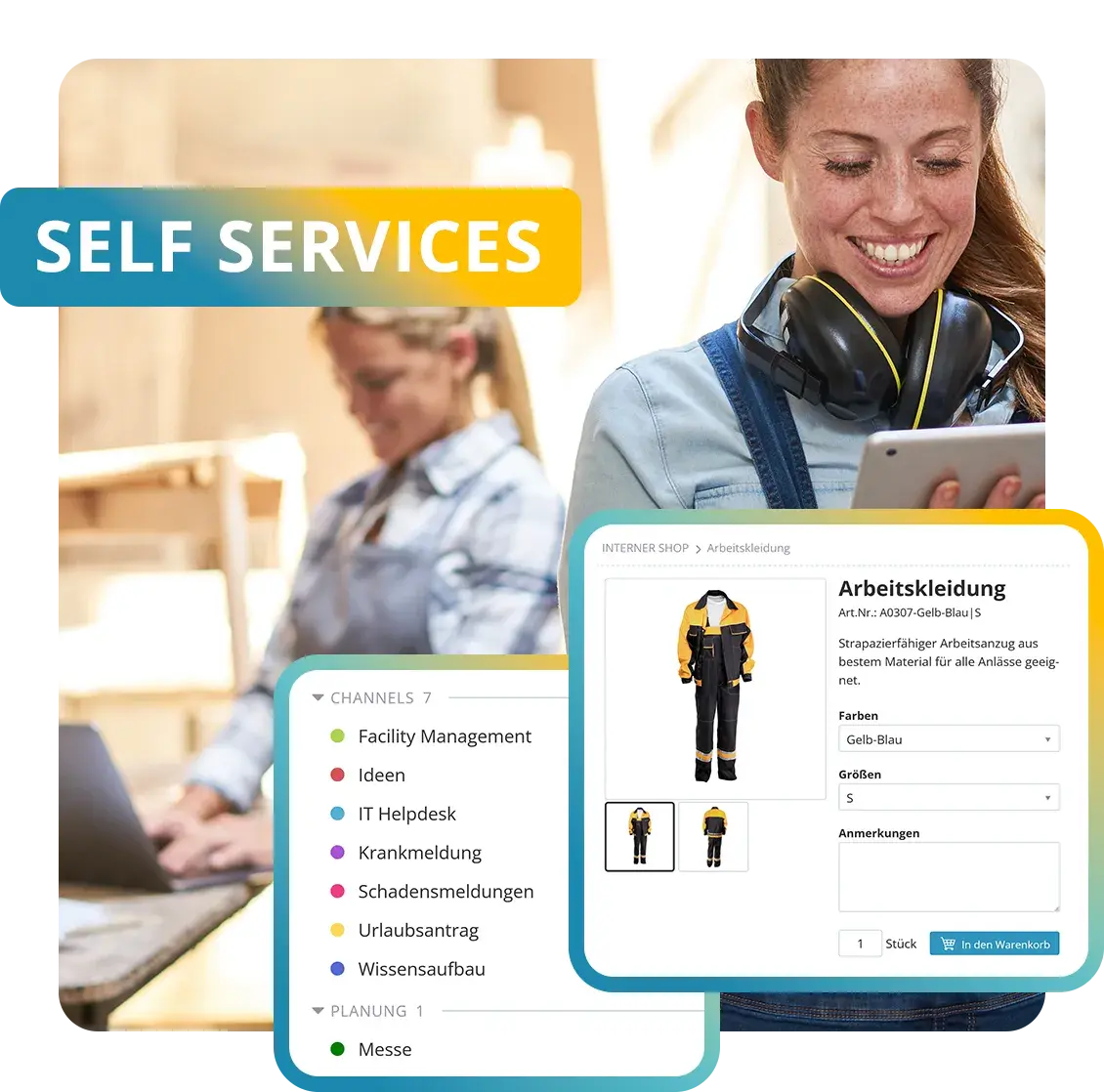
Requests, reports and questions start in KenCube with the right form and automatically continue as a ticket. Employees order the items they need in the internal shop and access personally delivered documents in their eBox. Each person only sees the services that are enabled for them.

  • GDPR-compliant, EU-sovereign
  • Cyber Trust Austria/Europe Label
KenCube Digital Workplace · Add-on module
Modules-Top-Self-Services-DE-v04.webp
KenCube-Self-Service-Ticketsystem-AC.webp
ADD-ON MODULE SELF-SERVICE WITH TICKET SYSTEM

Features at a glance

  • Ticket channels with their own forms and templates
  • Status, assignee and deadline for every ticket
  • Questions and answers directly on the ticket
  • Submission in the browser, in the app or via Quick Ticket
  • Ticket dashboard as board or table, Excel export
  • Internal shop with budgets and approval
  • Meal ordering with menu and order deadline
  • Personal documents in the eBox

The Self-Service with Ticket System add-on module can be added to the KenCube Suite at any time.

box-check-aircondition.webp

Track requests as tickets

Whether it is a damage report, a sick note or an idea, every request goes straight to the right team.

Employees can check the processing status themselves at any time. Follow-up questions run through the ticket instead of e‑mail.

box-carpentry-woman.webp

Order internally like in an online shop

Workwear, office supplies or promotional items are ordered in no time, with clear budgets and approvals.

Lunch can also be ordered in advance, with menu and allergen information.

box-roadworker.webp

Deliver documents personally

Payslips and certificates go straight into the personal eBox, without paper and without a detour via e‑mail.

Only the authorized recipient can see these documents. Even administrators have no access.

DIF
WPH
LWA
NOV
MDC
KHW
THI
Admiral
SWN
COM
LRA
FBS
SBH
ETL
AZK
SAN
SBA
ALP
POE
LEH
DTV
HWK
BLA
VIM
BAR
BMG
BLB
MOL
MON
LTW
WEY
SMZ
REY

Self-service portal with ticket system for all employees

Self-Service with Ticket System is the KenCube add-on module for requests, orders and personal documents. Tasks that would otherwise involve paper forms, e‑mails or phone calls are handled by employees themselves, in the browser and in the KenCube‑app. Each person only has access to the services that are enabled for them.

Capture requests and reports as tickets

Each topic has its own ticket channel, for example for IT support, facilities, HR or ideas, with its own forms including mandatory fields and its own processing team. Every submission becomes a ticket with a status, a responsible person and a deadline. Questions and answers stay with the ticket and do not get lost in the inbox.

Submit requests without detours

Anyone enabled for a ticket channel can submit tickets. Submissions are made directly in the browser or in the KenCube‑app. Employees see the status of their own tickets in their personal area under “My Tickets”. The ticket dashboard with all requests in a channel is reserved for the responsible team and management. Frequent reports such as sick notes can also be offered as a shortcut button right on the dashboard. With the AI Companion, tickets can also be created by giving an instruction in the AI Chat.

Process tickets as a team

The responsible team works in the ticket dashboard, either as a Kanban board or a table, with filters and saved filter sets. Templates speed up recurring requests. For analysis, the tickets in a channel can be exported as an Excel file, with one column per form field.

Order workwear and meals

In the internal shop, workwear, office supplies or promotional items are ordered from a catalog with sizes and variants. Budgets and approvals define who may order what, and fulfillment varies by product and supplier. Meals from the cafeteria or a caterer are handled via meal ordering, with menu, allergens, order deadline and cancellation.

Deliver payslips digitally

The organization uses the eBox to deliver payslips, certificates or contracts to specific individuals. Only the authorized recipient sees the document, neither other users nor administrators. Assignment happens automatically via the employee number, and a PIN can optionally protect access. No detour via e‑mail is needed.
Stefan Schiegl, Alphatec Schaltschranksysteme GmbH
At first, some people smiled at the idea of tickets. Today they say: ‘Better send me a ticket, then I won’t forget it.
Stefan Schiegl, Managing Director TechnologyAlphatec Schaltschranksysteme GmbH

Self-Service with Ticket System FAQ

What is an employee self-service portal?

A self-service portal is the part of a digital workplace where employees handle recurring requests themselves. Applications and reports are submitted via forms, orders are placed in the internal shop and personal documents are retrieved from the eBox. Every request becomes a traceable ticket for the responsible team.

Because everything is accessible in the browser and in the KenCube app, the portal is also used by employees in production, logistics, retail or field service, with no company PC, VPN or company email address required. Each person only has access to the services that have been enabled for them.

Which applications and reports can be handled digitally?

Typical examples include sick notes, vacation requests, damage reports, IT requests and the company suggestion scheme. A separate ticket channel with suitable form fields is set up for each type of request. Submitted forms automatically arrive as tickets with the responsible team.

Because channels can be set up freely, the list of use cases is not limited to a fixed catalog. New use cases can be added as needed.

How are tickets submitted and processed by the team?

Tickets are submitted via a form, as a quick ticket or with shortcut buttons on the dashboard, for example for sick notes. No separate access to the ticket system is needed. Employees can check the status at any time under “My tickets”.

Each ticket has a status, an owner and a deadline, and follow-up questions and replies stay with the ticket instead of in an email inbox. The team works in the ticket dashboard as a board or table and can export a channel's tickets as an Excel file for analysis.

How does an internal shop with budgets work?

The internal shop provides a catalog with sizes and variants, for example for workwear, office supplies or promotional items. Employees add items to their cart and track their order by its status.

Budgets and approvals determine who may order what and how much. Fulfillment varies depending on the product and supplier. For meals from the cafeteria or a caterer, there is also meal ordering with a menu and an order deadline.

Are personal documents such as payslips delivered in compliance with data protection rules?

Yes. Payslips, certificates or contracts are delivered to the personal eBox, and they are assigned automatically via the employee number. Only the authorized recipient can open the document, and not even the administration can see it there. If desired, a PIN additionally protects access.

The data is hosted in compliance with the GDPR in ISO 27001 certified data centers in the EU. Because the eBox is also available in the KenCube app, delivery reaches employees without a company email address as well.

Is the self-service portal included in the core system?

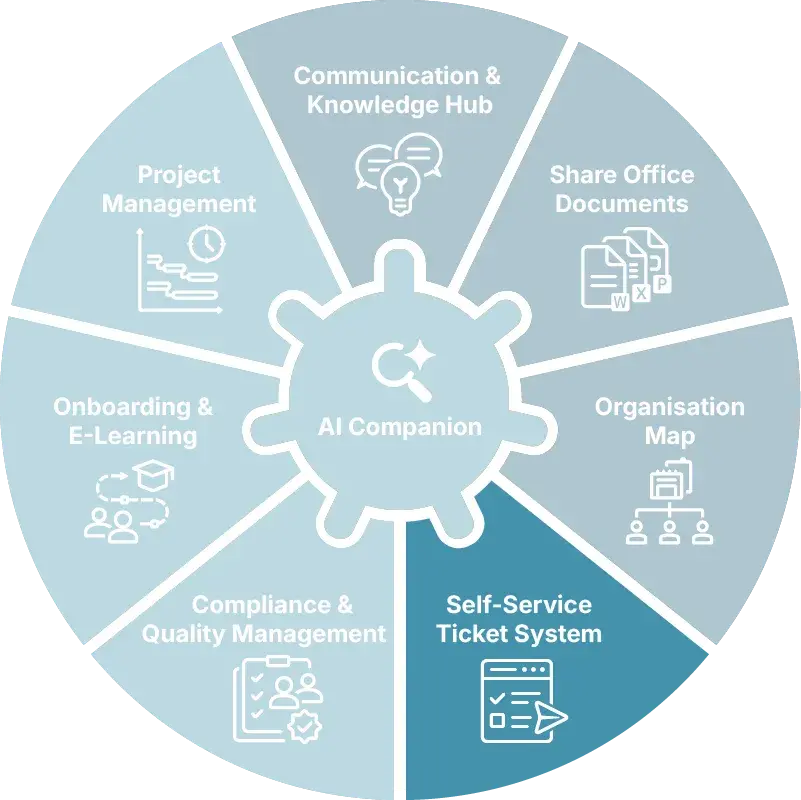
No, Self-Service with Ticket System is an add-on module of the KenCube Suite. The module can be added at any time and is integrated immediately, with the same users, permissions and data as the core modules Communication & Knowledge Hub, Share Office Documents and Organization Map.

Explore KenCube

We would be happy to present our KenCube Suite to you in a no-obligation online demo.
If you are interested, we can also provide you with access to a free trial version.

Start Free Trial